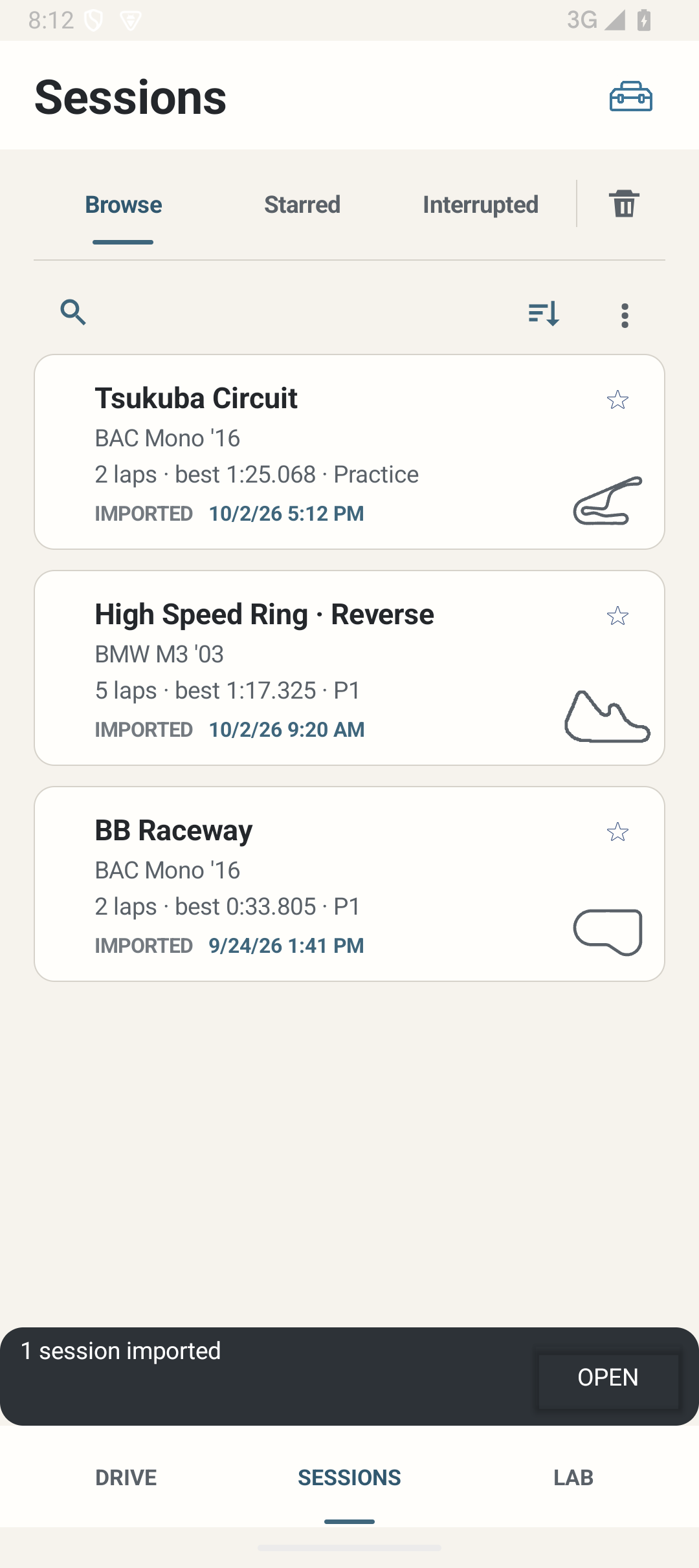
Where: Sessions in the bottom navigation.
How to use it
- Choose Browse, Starred, Interrupted or Rejected. These are views of stored records, not separate exported file types.
- Use Search for track/car text. Clear the query to return to the list. A search that matches nothing does not mean the underlying Sessions were deleted.
- Use Sort to select Date, Track or Car. Re-select the current sort field to reverse its direction. Date starts newest first.
- Tap a Session to view details. Star a Session to make it easy to find; stars also protect its detailed traces from normal budget eviction.
- Use the overflow menu for selection, Import/restore and Backup all. Selection mode exposes relevant actions; Cancel leaves the stored Sessions unchanged.
Options and defaults
| Control | Fresh default | Values / action | Condition or meaning |
|---|---|---|---|
| Browse / Starred / Interrupted / Rejected | Browse | Tabs | Filters current local history |
| Search | No query | Track/car text; clear | Does not modify Session content |
| Sort | Date newest | Date / Track / Car, reversible direction | No significance/coaching ranking |
| Star | Unstarred for new records | On / Off per Session | Protects available detail from budget eviction |
| Select / Cancel | No selection | Multi-selection mode | Actions depend on selected records |
Operating principle and expected output
Session identity and list context are retained when returning from details; a newly opened detail begins at the top. Imported records keep imported provenance. Deterministic track thumbnails are context, not proof of detailed map availability.
When output is absent or limited
A clean install has no Sessions. Search, tab and sort filters can hide an expected record. Interrupted work may need explicit recovery. A summary may exist without detailed telemetry.